The All-in-One Tool Transforming Business Operations

In today’s fast-paced digital world, businesses need more than just basic contact management—they need a complete system that can streamline operations, improve communication, automate daily tasks, and enhance customer relationships. CRM Runner has emerged as one of the most versatile platforms built to meet these demands, especially for service-based businesses that want a smarter way to manage teams, customers, and projects.

At its core, CRM Runner is designed to help businesses operate more efficiently by bringing all essential tools under one roof. Instead of switching between multiple apps for scheduling, invoicing, communication, and field-team tracking, the platform consolidates everything into a single, easy-to-use dashboard. This not only saves time but also reduces errors and increases productivity across the entire organization.

One of the standout features of CRM Runner is its comprehensive job and task management system. Managers can assign tasks to team members, set deadlines, add instructions, and monitor progress in real time. This ensures accountability and keeps projects moving smoothly from start to finish. For field service businesses, the ability to track technician locations, send updates, and manage routes is especially valuable. With built-in GPS tracking and geofencing, companies can optimize schedules and respond quickly to urgent requests.

Another major advantage is the platform’s automated billing and invoicing tools. Businesses can generate estimates, convert them into invoices, and accept payments directly through the system. Automated reminders ensure that clients stay informed and payments don’t slip through the cracks. For companies that handle multiple jobs daily, this type of automation can significantly cut down administrative workload and improve cash flow.

Customer communication is also a major highlight. CRM Runner provides SMS, email, and in-app messaging, allowing businesses to keep clients updated every step of the way. Automated notifications—such as appointment reminders or job-completion alerts—help build trust and improve the customer experience. Better communication leads to fewer misunderstandings, higher satisfaction, and more repeat business.

The platform also includes a powerful inventory and equipment tracking feature. Service companies often struggle to monitor tools, parts, and materials, resulting in lost items or delayed jobs. CRM Runner solves this by allowing teams to check items in and out, monitor usage, and track stock levels in real time. This keeps operations organized and prevents costly losses.

Reporting and analytics round out CRM Runner’s strengths. Business owners can generate detailed reports on revenue, employee performance, job history, customer activity, and more. These insights help leaders make smarter decisions, identify trends, and uncover areas for improvement.

Ultimately, CRM Runner is more than just a customer relationship manager—it’s a complete business operations platform. Whether you’re managing a contracting company, cleaning service, HVAC team, or any field-service operation, the system brings together all the tools you need to stay organized, efficient, and ready for growth. With CRM Runner, businesses can spend less time dealing with administrative headaches and more time delivering exceptional service to their customers.

Unlock Business Growth with Powerful CRM Software – Why CRM Runner Is Your Best Choice

In today’s highly competitive business landscape, building strong customer relationships is more important than ever. Whether you’re a small business or a large enterprise, managing customer interactions, sales pipelines, team tasks, and daily operations can become overwhelming without the right tools. That’s where CRM software plays a transformative role. And when it comes to a complete, all-in-one solution, CRM Runner stands out as a leader in helping businesses streamline their processes, enhance customer engagement, and boost overall productivity.

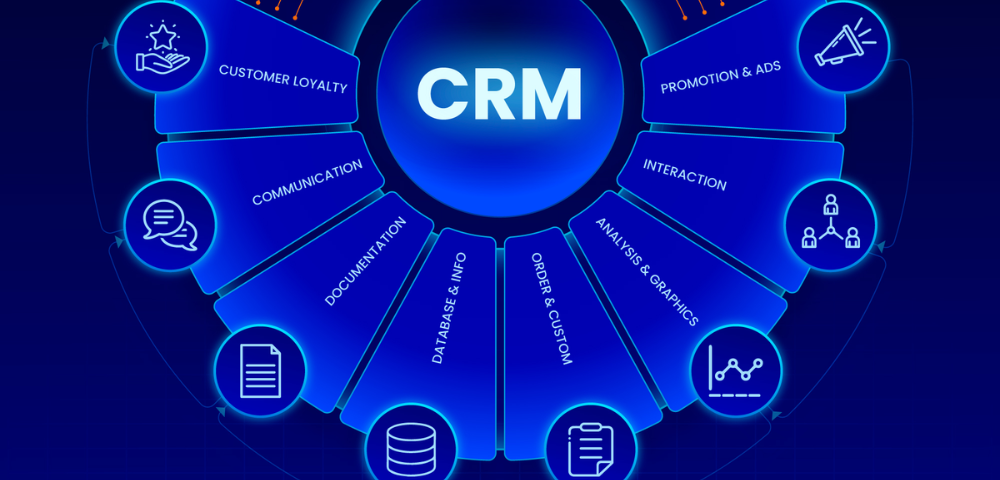
Customer Relationship Management (CRM) software allows businesses to store customer information, track interactions, monitor sales progress, automate tasks, and manage internal workflows—everything from one central platform. Instead of switching between multiple tools for scheduling, communication, invoicing, and reporting, CRM Runner brings all these essential features together under one powerful system.

One of the biggest advantages of CRM Runner is its user-friendly interface. The platform is designed to simplify complex tasks, making it easy for teams to adopt and use daily. You don’t need to be tech-savvy to operate it. From managing leads to tracking team performance, every feature is intuitive and built to save time. This means businesses can focus more on delivering value rather than spending hours navigating complicated software.

Another major benefit of CRM Runner is its automation capabilities. Automation helps eliminate repetitive tasks such as sending follow-up emails, assigning jobs, generating invoices, or updating customer records. By reducing manual work, businesses can improve accuracy and efficiency. Automation also ensures that no lead or customer inquiry is ever missed, helping businesses maintain high customer satisfaction.

Field service businesses, contractors, sales teams, and service providers particularly benefit from CRM Runner’s job management tools. The software allows users to assign jobs, monitor employee locations, track work progress, and ensure complete visibility across operations. Whether your team works from the office or in the field, CRM Runner ensures seamless communication and coordination.

Data security and reliability are also top priorities for CRM Runner. Businesses can store customer information, documents, and project data with confidence. The system uses modern encryption and secure cloud-based storage to ensure your business data is always protected.

Moreover, CRM Runner offers robust reporting and analytics. Business owners can quickly access insights into customer behavior, team performance, sales trends, and revenue growth. These reports help guide smarter business decisions and reveal areas for improvement—making CRM Runner not just a software tool, but a partner in long-term business success.

In a world where customer expectations continue to grow, having a reliable CRM system is essential. CRM Runner empowers businesses to stay organised, improve customer relationships, and operate with increased efficiency. Whether you want to manage sales, automate tasks, track fieldwork, or enhance team performance, CRM Runner provides everything you need in one powerful platform.

For businesses ready to elevate their operations and deliver exceptional customer service, CRM Runner is the smart choice.

If you want hashtags, a social media post version, or a shorter summary, I can create that too!

Why CRMRunner Leads the Future of Customer Management

In today’s fast-paced digital world, managing customer relationships efficiently is the key to long-term business success. Companies of all sizes are actively seeking tools that streamline communication, automate workflows, track sales performance, and enhance customer satisfaction. This is where CRM software becomes an essential part of modern business operations—and CRMRunner stands out as a powerful, all-in-one solution designed to simplify and strengthen every stage of customer management.

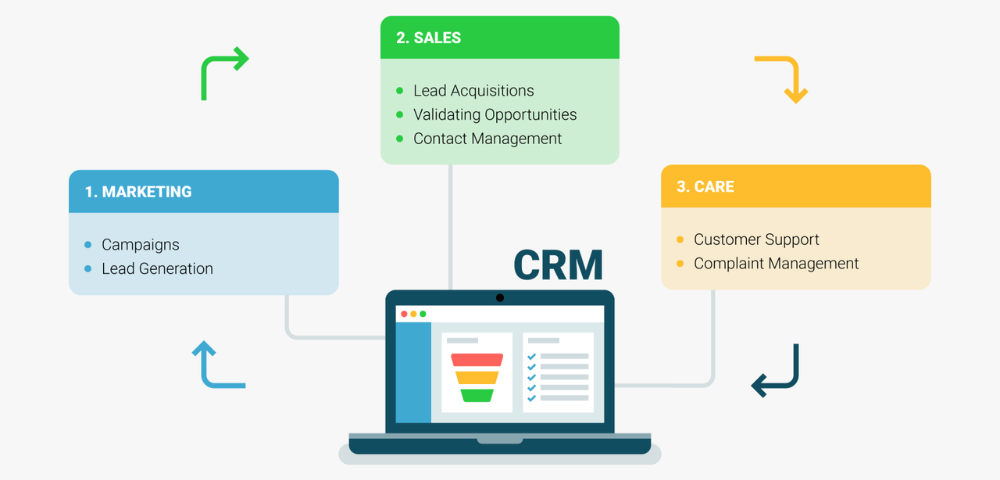
CRMRunner goes beyond traditional CRM systems by offering a fully integrated platform that supports sales teams, field service operations, marketing departments, and customer support staff. With real-time tracking, automated task management, lead monitoring, and advanced reporting tools, it provides businesses with everything they need to stay organized, productive, and competitive.

One of the greatest advantages of CRMRunner is its ability to centralize customer data. Instead of juggling spreadsheets or switching between disconnected apps, users can access all essential information—from customer history and invoices to service schedules and communication logs—right from one intuitive dashboard. This not only improves accuracy but also ensures faster response times and better decision-making.

CRMRunner also excels in automation. From follow-up reminders and billing processes to task assignments and field operations, the system eliminates repetitive manual work and allows teams to focus on activities that drive revenue. Built-in tools such as GPS tracking, electronic signatures, and appointment scheduling make it particularly valuable for businesses that manage field technicians or remote teams.

Another standout feature is CRMRunner’s focus on customer experience. By tracking customer interactions and analyzing trends, businesses can create personalized services, improve retention, and build stronger relationships. The platform’s communication tools—such as SMS, email, and internal messaging—allow smooth interaction both inside and outside the organization.

For growing businesses, scalability is crucial, and CRMRunner is designed to expand with your needs. Whether you’re handling a small client list or managing thousands of contacts, the software remains fast, secure, and adaptable. Its cloud-based architecture ensures accessibility anytime, anywhere, empowering teams to work efficiently from the office, the field, or on the go.

In a competitive marketplace, having a reliable CRM system is no longer optional—it’s a necessity. CRMRunner offers an unmatched blend of functionality, usability, and advanced features that elevate business performance. From lead management and sales tracking to project planning and customer support, every tool is designed with simplicity and efficiency in mind.

By adopting CRMRunner, businesses can streamline their operations, improve productivity, reduce errors, and deliver exceptional customer experiences. It is truly a smart investment for any organization aiming to grow faster and operate more effectively.

If you’re ready to enhance your business workflow and build stronger customer relationships, CRMRunner is the CRM software that will take your company to the next level.

What Is CRM Software and Why It Matters for Modern Businesses

In today’s competitive business landscape, customer expectations are higher than ever. People want personalized experiences, quick responses, and seamless communication across all channels. For businesses trying to keep up, Customer Relationship Management (CRM) software has become an essential tool. Far more than a digital address book, CRM software helps companies organize customer data, streamline sales processes, improve service quality, and ultimately strengthen customer relationships.

At its core, CRM software centralizes all customer information—such as contact details, purchase history, preferences, and past interactions—into one accessible platform. Instead of searching through emails, spreadsheets, or handwritten notes, teams can instantly find the data they need. This kind of organization not only saves time but also ensures that every customer interaction feels informed and personalized.

For sales teams, CRM systems serve as a powerful engine that drives growth. Features like lead tracking, pipeline management, and automated follow-ups help sales representatives stay on top of opportunities. By visualizing the entire sales funnel, businesses can spot bottlenecks and forecast revenue more accurately. Automated reminders ensure that no lead slips through the cracks, and reporting tools reveal which strategies are working and which need improvement.

Marketing teams also benefit greatly from CRM software. With centralized data, marketers can segment their audience and create targeted campaigns that resonate with specific customer groups. Many CRM platforms integrate with email marketing tools, enabling automated workflows such as welcome emails, promotional offers, or re-engagement campaigns. When every marketing effort is backed by real customer data, the results are more relevant and impactful.

Customer service teams use CRM software to deliver consistent, high-quality support. When a customer reaches out with a question or issue, support agents can quickly view that person’s history—including purchases, past conversations, and preferences. This allows for faster resolutions and more personalized assistance. Some CRMs also include ticketing systems, chat integrations, and knowledge base tools to help teams work more efficiently.

In addition to improving processes, CRM software enhances collaboration across departments. Sales, marketing, and customer service teams all work from the same data, ensuring that everyone stays aligned. This transparency leads to smoother handoffs and a better overall customer experience.

Modern CRM systems often use AI and automation to take efficiency even further. Predictive analytics can identify which leads are most likely to convert. AI-powered chatbots can handle routine inquiries. Automated workflows streamline repetitive tasks so employees can focus on more meaningful work.

With a wide range of options available—from simple, affordable tools for small businesses to advanced platforms for large enterprises—finding the right CRM depends on your goals, team size, and budget. But regardless of the specific solution, the benefits are clear: better organization, improved communication, stronger customer relationships, and increased revenue.

In a world where customer experience is everything, CRM software isn’t just helpful—it’s essential.

How Inventory Purchase Order CRM Software Can Transform Your Business Operations

In today’s fast-paced business environment, managing inventory and purchase orders efficiently is crucial for companies of all sizes. Traditional methods like spreadsheets or manual tracking are not only time-consuming but also prone to errors that can disrupt operations. This is where Inventory Purchase Order CRM software comes in, offering a comprehensive solution to streamline inventory management, improve procurement processes, and enhance overall business productivity.

One of the primary advantages of Inventory Purchase Order CRM software is its ability to centralize data. Instead of juggling multiple systems for inventory, suppliers, and customer information, this software integrates all essential data into a single platform. Businesses can track stock levels in real-time, monitor pending purchase orders, and manage supplier relationships seamlessly. This centralization reduces errors, eliminates duplicate data entry, and allows staff to focus on higher-value tasks such as analyzing trends and planning for demand fluctuations.

Automation is another key benefit. Inventory Purchase Order CRM software can automatically generate purchase orders when stock levels drop below a defined threshold, ensuring you never run out of critical items. It can also send notifications to suppliers, track delivery schedules, and update inventory records instantly upon receipt of goods. By automating these processes, businesses reduce human error, save time, and improve order accuracy, which ultimately enhances customer satisfaction.

Additionally, this software provides valuable insights through detailed reporting and analytics. Managers can monitor inventory turnover rates, supplier performance, and purchasing trends to make data-driven decisions. For example, if a particular product consistently runs low before restocking, the system can recommend adjusting order quantities or changing suppliers to prevent future shortages. Analytics capabilities also help identify slow-moving items, enabling companies to optimize stock levels and reduce carrying costs.

Another critical feature of Inventory Purchase Order CRM software is its ability to improve collaboration across departments. Sales, procurement, and finance teams can all access up-to-date inventory and purchase order information in real-time. This visibility ensures that sales commitments are aligned with inventory availability, procurement decisions are informed by demand forecasts, and finance teams can monitor expenses accurately. Enhanced collaboration reduces miscommunication, prevents stockouts, and helps maintain smooth business operations.

Integration with other business tools is an added advantage. Many software solutions allow seamless connectivity with accounting systems, e-commerce platforms, and supplier portals, creating a cohesive ecosystem that streamlines workflows. This integration reduces manual work, speeds up financial reconciliation, and enhances overall operational efficiency.

Finally, implementing Inventory Purchase Order CRM software can scale with your business. Whether you are a small enterprise or a large corporation, the software can handle growing product lines, expanding supplier networks, and increasing transaction volumes. Its flexibility ensures that your inventory management system remains robust and effective even as your business evolves.

In conclusion, Inventory Purchase Order CRM software is an essential tool for modern businesses seeking to optimize their inventory and purchasing processes. By centralizing data, automating workflows, providing actionable insights, enhancing collaboration, and integrating with other systems, it empowers companies to operate more efficiently, reduce costs, and deliver better service to customers. Investing in such a solution is no longer optional—it is a strategic step toward business growth and operational excellence.

Streamline Your Business with CRM Runner: The Power of CRM Software

In today’s fast-paced business world, staying organized and maintaining strong customer relationships are key to success. That’s where CRM software comes in. As businesses grow, managing leads, clients, and daily operations can become overwhelming without the right system. CRM Runner is designed to simplify the way you handle customer management, team coordination, and business workflows — all in one powerful platform.

What Is CRM Software and Why Does It Matter?

CRM stands for Customer Relationship Management. It’s a software solution that helps businesses manage interactions with customers, track leads, streamline sales, and improve communication across teams. Instead of juggling multiple tools or spreadsheets, CRM software brings everything together in one place — making it easier to access data, automate tasks, and build stronger relationships with clients.

With CRM Runner, you get more than just a traditional CRM system. It’s an all-in-one business management tool built to meet the needs of service-based companies, contractors, and small to mid-sized businesses. From scheduling jobs to tracking sales performance and managing field staff, CRM Runner keeps your entire operation running smoothly.

Key Features of CRM Runner

CRM Runner offers a comprehensive suite of tools designed to enhance productivity and customer satisfaction. Some of its standout features include:

  • Lead & Sales Management: Track prospects from the first contact to final sale. Automate follow-ups, assign leads to team members, and close deals faster.

  • Field Management: Ideal for service businesses, you can assign tasks, monitor technicians in real-time, and manage routes efficiently using GPS tracking.

  • Inventory Management: Keep track of your stock levels, manage suppliers, and ensure your team always has what they need for every job.

  • Invoicing & Payments: Create professional invoices instantly and accept payments directly through the platform — reducing paperwork and saving time.

  • Customer Support: Stay connected with customers through built-in messaging and service ticket management to resolve issues quickly and professionally.

These features help eliminate manual work, reduce human error, and improve the overall customer experience.

Benefits of Using CRM Runner

Using CRM Runner gives your business a competitive edge by increasing efficiency and organization. You can monitor performance metrics, view real-time updates, and make informed decisions using detailed analytics and reports. Automation ensures that no lead or task falls through the cracks, while mobile accessibility allows your team to stay connected anywhere, anytime.

Additionally, CRM Runner helps strengthen relationships with your customers. With access to complete interaction histories, your team can provide personalized service that builds trust and loyalty — key ingredients for long-term success.

Whether you’re a startup, contractor, or growing business, investing in reliable CRM software is one of the smartest decisions you can make. CRM Runner empowers you to manage leads, track jobs, organize your team, and streamline communication — all from one easy-to-use platform.

Take control of your business operations and watch productivity soar. Experience the difference with CRM Runner — where customer relationships meet smart management.

The Power of Marketing CRM Software: Turning Data into Growth

In today’s fast-paced digital world, customers expect personalized, timely, and consistent experiences from brands. Businesses that can deliver this level of engagement are the ones that thrive. That’s where marketing CRM (Customer Relationship Management) software comes in. It’s not just a tool—it’s the backbone of modern marketing strategies that drive growth, loyalty, and measurable ROI.

What Is Marketing CRM Software?

Marketing CRM software is a system that helps businesses manage, analyze, and nurture customer relationships throughout the entire buying journey. It centralizes customer data—from email interactions and social media engagement to purchase history—into one unified platform. This allows marketers to segment audiences, automate campaigns, and measure performance with incredible accuracy.

In essence, it bridges the gap between marketing and sales, ensuring that every customer touchpoint is consistent and personalized.

Why Businesses Need a Marketing CRM

  1. Centralized Customer Data
    Instead of juggling multiple spreadsheets or disconnected tools, a marketing CRM provides a single source of truth for all customer information. This holistic view allows teams to understand who their customers are, what they want, and how best to communicate with them.

  2. Personalized Marketing at Scale
    Personalization is no longer optional—it’s expected. A CRM helps marketers create segmented campaigns based on customer behavior, demographics, or preferences. Whether it’s sending a birthday discount or recommending products based on past purchases, automation ensures each message feels unique and relevant.

  3. Improved Team Collaboration
    Marketing and sales teams often struggle with alignment. A CRM bridges this gap by sharing insights and tracking the customer journey from initial contact to final sale. This transparency fosters collaboration and ensures that both teams are working toward the same goals.

  4. Data-Driven Decision Making
    With built-in analytics, CRMs allow marketers to measure campaign performance, track conversion rates, and identify what’s working—or what’s not. These insights help refine strategies and maximize marketing ROI.

Key Features to Look For

When choosing a marketing CRM, consider features such as:

  • Marketing automation: Schedule emails, manage campaigns, and nurture leads automatically.

  • Segmentation and targeting: Group customers based on shared characteristics for more precise marketing.

  • Analytics and reporting: Visualize campaign success and track KPIs in real time.

  • Integrations: Connect seamlessly with email tools, social media platforms, and eCommerce systems.

The Bottom Line

Marketing CRMRUNNER CRM software empowers businesses to understand their customers, build stronger relationships, and streamline marketing efforts. It transforms raw data into actionable insights—helping marketers deliver the right message, to the right person, at the right time.

In an age where customer experience defines success, a robust marketing CRM isn’t just a competitive advantage—it’s a necessity.

Streamlining Workforce Management: The Power of HR Payment Structure CRM Software

Managing people and payroll efficiently has always been one of the biggest challenges for organizations. As companies grow, tracking employee performance, attendance, and compensation becomes increasingly complex. That’s where HR Payment Structure CRM Software steps in—a powerful solution that integrates human resources management with payment processing and customer relationship management features to simplify operations, enhance transparency, and drive organizational success.

What Is HR Payment Structure CRM Software?

HR Payment Structure CRM Software is a comprehensive system designed to manage employee data, payroll, performance metrics, and internal communications—all within a single digital platform. Unlike traditional HR systems that focus solely on record keeping, this software leverages CRM (Customer Relationship Management) principles to improve relationships—not just with customers, but with employees as well.

By combining HR functions with CRM tools, businesses can streamline administrative tasks, ensure accurate payment structures, and foster stronger engagement across teams.

Key Features and Benefits

  1. Automated Payroll and Payment Management
    Manual payroll processing can lead to errors, delayed payments, and compliance risks. HR Payment Structure CRM Software automates these tasks, ensuring that employees are paid accurately and on time. It calculates deductions, bonuses, incentives, and taxes automatically, reducing human error and saving valuable time for HR teams.

  2. Transparent Compensation Structures
    The software allows HR managers to design and implement transparent pay structures based on roles, experience, and performance. Employees gain visibility into how their compensation is determined, fostering trust and satisfaction within the workplace.

  3. Integrated Employee Data and Performance Tracking
    A CRM-based HR system doesn’t just store employee data—it tracks performance, attendance, and key deliverables. This integration helps managers make informed decisions about promotions, salary revisions, and incentives, all backed by accurate data.

  4. Compliance and Reporting Made Simple
    Keeping up with labor laws, tax regulations, and reporting requirements can be daunting. With automated compliance features, the software ensures all payroll and HR operations adhere to legal standards. Reports can be generated instantly for audits or management reviews.

  5. Enhanced Employee Engagement and Retention
    By incorporating CRM features, HR departments can communicate more effectively with employees. Feedback tools, satisfaction surveys, and performance dashboards foster open dialogue and continuous improvement, leading to higher retention and a stronger company culture.

Why Your Business Needs It

In a competitive business landscape, efficiency is everything. HR Payment Structure CRM Software eliminates the need for multiple disconnected systems, offering a unified platform where payroll, HR analytics, and employee engagement coexist. This integration not only saves time and money but also empowers HR teams to focus on strategic initiatives—like talent development and workforce planning—instead of administrative burdens.

Investing in HR Payment Structure CRM Software is more than a technology upgrade—it’s a strategic move toward smarter, data-driven human resource management. It brings clarity to compensation, consistency to payroll, and collaboration to the heart of your organization.

In an era where employee experience drives business success, adopting a robust HR CRM system ensures that your workforce feels valued, informed, and rewarded—every single payday.

Understanding Payment Structure in CRM Software: How It Shapes Business Efficiency

In today’s competitive business environment, Customer Relationship Management (CRM) software has become an essential tool for managing leads, nurturing customer relationships, and driving sales growth. However, one often-overlooked aspect of CRM systems is the payment structure—the way users are billed for the software’s features and services. Understanding this structure is key to selecting the right CRM platform for your organization and optimizing your return on investment.

1. What Is Payment Structure in CRM Software?

The payment structure of CRM software refers to the pricing model or billing method used by the vendor. Different providers adopt different approaches based on the features offered, the scale of the business, and the level of customization required. Generally, CRM systems follow one of several common payment models, including subscription-based pricing, tiered pricing, or pay-as-you-go plans.

2. Common Types of CRM Payment Models

a. Subscription-Based Model:
This is the most popular structure among CRM vendors. Users pay a recurring fee—monthly or annually—to access the platform. Subscriptions often come in multiple tiers (e.g., Basic, Professional, and Enterprise), each with varying levels of functionality. This model provides predictable costs and scalability, making it suitable for businesses of all sizes.

b. Per-User Pricing:
Many CRM systems charge per active user per month. This approach ensures that businesses only pay for the employees who actively use the software. It’s particularly useful for growing teams because you can easily add or remove users as your workforce changes.

c. Feature-Based Pricing:
Some CRMs charge based on the specific modules or features your business needs. For example, you might pay extra for advanced analytics, marketing automation, or AI-powered forecasting tools. This model works well for companies that want flexibility without overpaying for unused functions.

d. Pay-As-You-Go Model:
In this structure, you pay only for the amount of usage—such as the number of contacts stored, messages sent, or deals closed. This model is ideal for startups or small businesses with fluctuating workloads.

3. Factors That Influence CRM Pricing

Several factors can affect how much a business pays for CRM software:

  • Number of users: More users typically mean higher costs.

  • Customization needs: Tailored dashboards, workflow automation, or integrations with third-party tools can increase pricing.

  • Deployment type: Cloud-based CRMs usually have subscription fees, while on-premise systems involve a one-time license cost plus maintenance.

  • Support and training: Premium support, onboarding sessions, and training materials often come as add-ons.

4. Why Payment Structure Matters

Choosing the right payment structure helps businesses manage costs effectively and align CRM expenses with usage patterns. A flexible pricing model ensures scalability as your company grows, while transparent billing helps prevent hidden costs. Understanding your team’s needs and forecasting long-term usage can help you select the most cost-efficient plan.

The payment structure of CRM software is more than just a billing detail—it’s a strategic decision that influences how efficiently your business manages customer relationships. By evaluating different pricing models and aligning them with your operational goals, you can ensure that your CRM investment delivers maximum value.

Understanding the Payment Structure of CRM Software: What You Need to Know

In today’s fast-paced business world, customer relationship management (CRM) software has become essential for streamlining sales, enhancing customer service, and improving marketing strategies. But before selecting the right CRM, it’s crucial to understand the payment structure crm software. Knowing how CRM pricing works can help businesses choose a solution that fits both their budget and operational needs.

1. Subscription-Based Pricing

The most common payment structure for CRM software is the subscription-based model. In this setup, users pay a recurring fee—usually monthly or annually—to access the software. This model is ideal for businesses that want to avoid large upfront costs.

Key Features:

  • Monthly/Annual Billing: Discounts are often available for annual subscriptions.

  • Tiered Plans: Most CRMs offer several plans (e.g., Basic, Professional, Enterprise) with increasing features and user limits.

  • Scalability: Easy to upgrade or downgrade as your business needs change.

Popular CRMs like Salesforce, HubSpot, and Zoho follow this model, offering flexible plans tailored to different business sizes and industries.

2. Per User Pricing

Most CRM platforms combine the subscription model with per-user pricing. This means you pay based on how many team members will use the software.

Pros:

  • Cost-efficient for small teams.

  • You only pay for what you need.

Cons:

  • Costs can rise quickly as your team grows.

  • May limit access for cross-functional collaboration if licenses are restricted.

For example, a CRM might charge $25 per user per month. A 10-person sales team would cost $250/month on a standard plan.

3. Freemium and Free Trials

Many CRM providers offer freemium models or free trials. These options allow businesses to try before they buy, which is great for evaluating the software’s fit.

Freemium: Basic features are available for free, often with limits on users, storage, or integrations.
Free Trials: Full-featured access for a limited time (usually 14–30 days).

These models help startups or small businesses get started with CRM software without a financial commitment.

4. One-Time License Fee

Less common today, some CRM systems still offer a one-time license purchase—especially in on-premise solutions. While the upfront cost is higher, this can be cost-effective long term for large enterprises.

Considerations:

  • Requires in-house IT infrastructure.

  • Limited flexibility compared to cloud-based models.

  • Maintenance and updates may incur additional fees.

5. Add-On and Customization Costs

Beyond the core pricing model, businesses should also consider:

  • Add-on modules: Marketing automation, advanced reporting, or AI features.

  • Customization: Tailoring the CRM to fit unique workflows.

  • Integration Fees: Connecting with other tools like ERP, email marketing, or helpdesk platforms.

  • Training & Support: Some providers charge for onboarding or premium support services.

Choosing the right CRM isn’t just about features—it’s about finding a payment structure that aligns with your business goals. Carefully review pricing tiers, calculate per-user costs, and consider long-term scalability. A CRM should empower your team—not become a financial burden. With a clear understanding of CRM payment structures, you’ll be better positioned to make a smart investment that supports growth and customer success.

Boost Your Business Growth with Sales & Marketing CRM Software

In today’s fast-paced business world, staying ahead of the competition requires more than just great products or services — it requires strong relationships with customers and an efficient way to manage sales and marketing efforts. That’s where Sales & Marketing CRM software comes into play.

CRM stands for Customer Relationship Management, and it’s much more than a contact database. A Sales & Marketing CRM integrates key business functions to streamline communication, improve customer service, and boost conversions. Whether you’re a small business or a growing enterprise, the right CRM system can be a game-changer.

What is Sales & Marketing CRM Software?

Sales & Marketing CRM software is a digital tool that helps businesses manage interactions with current and potential customers. It combines sales pipeline management, marketing automation, customer data tracking, and analytics into a single platform.

Instead of juggling spreadsheets, emails, and scattered notes, your entire team can work from one system — tracking leads, scheduling follow-ups, managing campaigns, and analyzing results.

Key Features of a Sales & Marketing CRM

  1. Lead Management
    Track every lead from the first point of contact to closing the deal. Assign leads to your sales team, set priorities, and ensure no opportunity slips through the cracks.

  2. Marketing Automation
    Automate repetitive tasks like email campaigns, follow-ups, and social media posting. Create segmented lists to target the right audience with the right message.

  3. Contact Management
    Store detailed customer information, communication history, and purchase behavior in one place. This helps your team deliver personalized service and timely responses.

  4. Sales Pipeline Tracking
    Visualize your sales funnel to monitor prospects, forecast revenue, and identify bottlenecks in the process.

  5. Analytics & Reporting
    Generate real-time reports on campaign performance, team productivity, and customer engagement — helping you make data-driven decisions.

Why Your Business Needs It

  • Increased Efficiency: Automating tasks and organizing data frees up your team to focus on selling and nurturing leads.

  • Improved Customer Relationships: Access to full customer histories means more personalized service and better communication.

  • Better Team Collaboration: A central platform ensures your marketing and sales teams are aligned and working towards the same goals.

  • Data-Driven Strategy: With insights and analytics, you can refine your sales approach and marketing campaigns for better results.

Choosing the Right CRM Software

When selecting a CRM, look for one that fits your business size, industry, and specific needs. Popular CRM Software Like CRM Runner

Key things to consider include:
✔️ Ease of use
✔️ Integration with other tools
✔️ Customization options
✔️ Mobile access
✔️ Support and training availability

In a digital age where customer expectations are higher than ever, a Sales & Marketing CRM isn’t a luxury — it’s a necessity. It empowers businesses to build stronger relationships, close more deals, and grow faster. If you haven’t already implemented one, now is the time to explore your options and invest in the future of your business.

Enhance Data Integrity and Security with Permissions-Based CRM Software

In today’s data-driven business landscape, maintaining the security and integrity of customer information is not just a best practice—it’s a necessity. With rising threats of cyberattacks, internal data mishandling, and increasing regulatory requirements like GDPR and CCPA, businesses must adopt smarter tools to protect their data. One of the most effective ways to achieve this is by leveraging permissions-based CRM (Customer Relationship Management) software.

What is Permissions-Based CRM Software?

Permissions-based CRM software allows organizations to control access to sensitive customer data by assigning specific roles and permissions to users within the system. This means that not every employee has the same level of access to all data. Instead, access is granted based on job roles, responsibilities, and the principle of least privilege.

For example, a sales representative might only access leads and opportunities, while a finance officer can view billing and payment information. This segmentation minimizes the risk of unauthorized access and accidental data exposure.

Why Data Integrity and Security Matter

Data integrity refers to the accuracy and consistency of data over its lifecycle. Compromised data—whether from human error, system failure, or malicious intent—can lead to flawed decision-making, lost revenue, and damaged customer trust.

Data security, on the other hand, focuses on protecting data from unauthorized access, breaches, or leaks. With cyber threats becoming more sophisticated, relying on basic security measures is no longer sufficient.

A permissions-based CRM enhances both by ensuring the right people access the right data, at the right time—and no more.

Key Benefits of Permissions-Based CRM Software

  1. Reduced Risk of Data Breaches
    By restricting access, companies significantly lower the chance of internal data leaks or accidental sharing of sensitive information.

  2. Improved Compliance
    With audit trails and user activity logs, permissions-based CRMs make it easier to demonstrate compliance with data protection regulations.

  3. Increased Accountability
    Knowing that actions are traceable to specific users creates a culture of responsibility and reduces the risk of negligent behavior.

  4. Customizable Access Levels
    Organizations can tailor access based on departments, projects, or user roles—providing flexibility without compromising security.

  5. Better Data Quality
    Limiting who can edit or delete data helps maintain consistency, reduces duplication, and ensures only authorized personnel make changes.

Choosing the Right CRM

When selecting a CRM with robust permissions controls, look for features such as:

  • Role-based access control (RBAC)

  • Multi-factor authentication (MFA)

  • Detailed audit logs

  • Granular permission settings (e.g., view-only, edit, delete)

  • Integration with security protocols (SSO, encryption)

Popular CRM platforms like Salesforce, HubSpot, and Zoho offer advanced permission settings, but it’s crucial to configure them properly during implementation and review them regularly.

Data is one of your business’s most valuable assets. Protecting it requires more than firewalls and antivirus software—it demands a strategic approach to access control. Permissions-based CRM software offers a practical, effective way to enhance data integrity and security while empowering teams to do their jobs efficiently.

By implementing the right CRM tools with strong permission structures, you not only safeguard your customer data but also build trust, ensure compliance, and support smarter, more secure business operations.

Categories

Sign up for Fresh Content